By Ctrl Editorial Team · May 12, 2026 · 9 min read
Manual Task Capture Is Where Work Falls Apart
Manual task capture feels responsible, but it breaks under real work. Here’s how to build a better system for scattered tasks.
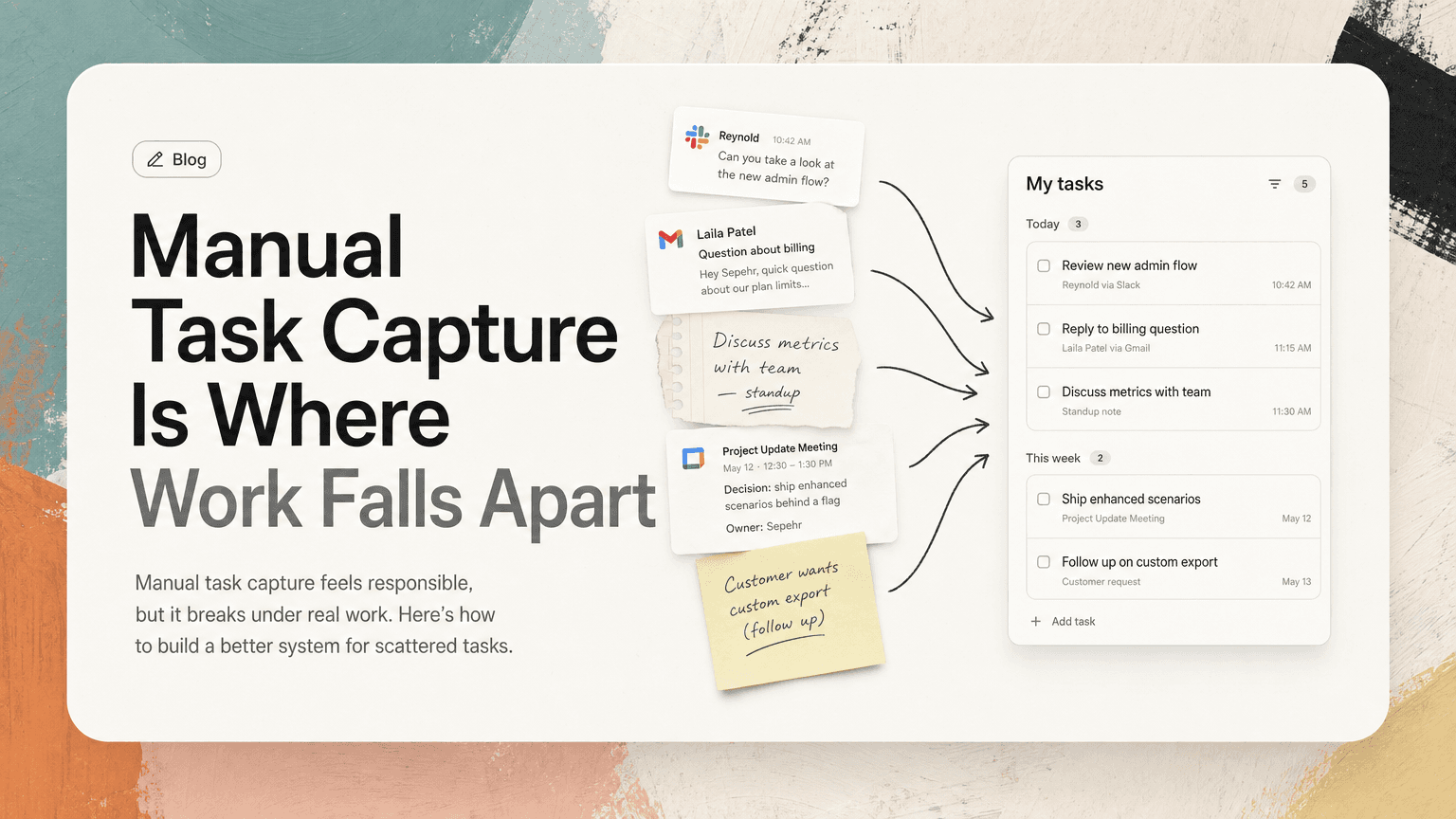
Manual task capture sounds simple: when something comes up, write it down.
A teammate asks for a follow-up in Slack. Add it to the list. A customer emails a question you need to answer later. Add it to the list. A meeting ends with three decisions and two owners. Add those too.
In theory, this is how reliable people stay reliable.
In practice, manual task capture breaks because modern work does not arrive in neat task-shaped packages. It arrives as fragments: a Slack reply, a comment in a thread, a calendar invite note, a meeting aside, a forwarded email, a quick “can you take this?” from someone who assumes you will remember.
The problem is not that people are careless. The problem is that the system depends on perfect attention at the exact moment attention is most fragmented.
Manual capture creates a second job
The first job is doing the work.
The second job is noticing, extracting, rewriting, filing, and maintaining the work before you can do it.
That second job is easy to underestimate. A single action item may require several small decisions:
- Is this actually a task or just useful information?
- Who owns it?
- Is there a deadline?
- Where should it live?
- What context will I need when I come back to it?
- Is this already on my list somewhere else?
- Is it urgent, important, or just loud?
Now multiply that by Slack, Gmail, meetings, shared docs, and hallway-style messages in tools that were not designed to be task systems.
Manual capture asks you to become a real-time translator between communication and execution. That is hard enough on a quiet day. On a busy day, it becomes a tax on every conversation.
The failure points are predictable
Manual task capture usually fails in a few specific ways. Once you see the pattern, it becomes easier to fix.
1. Work is hidden inside conversation
A lot of work does not look like a task when it first appears.
In Slack:
“Could we make sure the launch checklist includes the updated pricing page?”
In Gmail:
“Looping you in here — can you confirm whether the onboarding copy reflects the new plan names?”
In a meeting:
“Let’s have someone follow up with legal before we send this.”
None of these are formatted like tasks. There may be no checkbox, no due date, and no explicit owner. But if you are the person expected to act, the work is real.
Manual capture depends on you detecting these moments while also participating in the conversation. If you are answering questions, switching tabs, or thinking through a decision, it is easy to miss the task embedded in the sentence.
2. The same task shows up multiple times
Repeated action items are common because people communicate across channels.
A product manager mentions a launch dependency in a meeting. Later, an engineer asks about it in Slack. Then a founder forwards an email asking for the same update. If you manually capture each moment, you may end up with three versions of one task:
- Update launch checklist
- Confirm pricing page readiness
- Respond to founder on pricing dependency
These might be one task, two tasks, or three related tasks. Manual systems rarely handle that cleanly. They either create duplicates or force you to spend time reconciling them.
The result is a list that looks longer than reality, which makes prioritization harder.
3. Context gets separated from the action
A task without context is a future interruption.
“Follow up with Maya” is not enough when you return to it two days later. Follow up about what? Which thread? What did you decide? Was there a customer concern, a launch blocker, or a question from finance?
When you manually copy a task into a todo app, you often leave the original context behind. The task becomes portable, but less useful.
Then, when it is time to act, you have to search:
- Which Slack thread was this from?
- Was the latest decision in email or the meeting notes?
- Did someone already answer this?
- Is the task still relevant?
This is one of the hidden costs of manual capture: you do not just capture the work once. You often have to reconstruct it later.
4. Capture happens at the wrong time
The best moment to capture a task is often the worst moment for your attention.
During a meeting, you are listening, deciding, and maybe presenting. In Slack, you are scanning five threads between deep work blocks. In Gmail, you are trying to clear a queue while avoiding new commitments.
Manual capture asks you to pause and process each new obligation immediately. But if you do that every time something appears, you fragment your day. If you do not, you risk losing the task.
That is the trap: capture now and break focus, or capture later and hope memory holds.
A better task system starts before the todo list
Most people try to fix task capture by choosing a better todo app. That can help with organization, but it does not solve the upstream problem.
The issue is not only where tasks are stored. It is how they are recognized in the first place.
A better system has three layers:
- Collection: Notice possible tasks wherever work happens.
- Clarification: Turn vague fragments into clear next actions.
- Prioritization: Decide what matters now, not just what exists.
Manual capture tends to overload the first layer. You are expected to notice everything, instantly clarify it, and put it in the right place. A more reliable approach separates those steps.
How to make manual capture less fragile
Even if you still use a manual list, you can reduce the failure rate by changing how you handle incoming work.
Use a single capture inbox
Do not maintain separate personal task piles in Slack saved items, Gmail stars, meeting notes, sticky notes, and a todo app.
Pick one place where unfinished work lands before it is processed. It can be a task app, a notes page, or a simple running document. The point is not elegance. The point is reducing ambiguity.
When you see something actionable, send it there first. Do not worry about perfect formatting yet.
Examples:
- “Ask Devon for final API timeline from Slack thread”
- “Reply to customer about billing export question”
- “Check meeting notes for Q3 hiring decision and send recap”
This gives you one place to process, instead of five places to remember.
Capture the source, not just the task
Whenever possible, include the source of the work.
Bad:
Update onboarding email
Better:
Update onboarding email based on Priya’s comment in Monday growth meeting — check notes before editing
Better still:
Update onboarding email based on Priya’s comment in Monday growth meeting — link to notes/thread
The source matters because tasks change. Context tells you whether a task is still valid, who asked for it, and what decision created it.
If you cannot include a link, include enough detail to find it later: channel name, meeting name, sender, date, or subject line.
Process tasks in batches
Do not fully organize every task the moment it appears.
Instead, set one or two processing windows during the day. For example:
- Late morning: review new captures from Slack, email, and meetings.
- Late afternoon: clean up the list for tomorrow.
During processing, ask:
- Is this still needed?
- Is it mine?
- What is the next physical or digital action?
- Does it duplicate something already on the list?
- Does it need a deadline or a follow-up date?
Batching protects focus. You still capture quickly, but you clarify deliberately.
Rewrite vague tasks into next actions
A vague task is a decision you postponed.
Instead of:
Launch plan
Write:
Send launch plan draft to Nina and ask for feedback on timeline by Thursday
Instead of:
Customer follow-up
Write:
Reply to Acme thread with status on SSO bug and confirm next update date
Instead of:
Hiring sync
Write:
Add candidate scorecard decisions from hiring sync to shared notes
This small habit makes execution easier. When you return to the list, you should not need to ask, “What did I mean by this?”
Deduplicate before prioritizing
A messy list makes everything feel urgent.
Before deciding what matters today, scan for duplicates and related tasks. Combine them where possible.
For example, these might become one task:
- Respond to Jess about onboarding flow
- Review onboarding comments from sales
- Update onboarding doc with new objections
Combined:
Review sales feedback on onboarding flow, update doc, and reply to Jess with changes
Deduplication reduces list anxiety and prevents you from bouncing between different versions of the same work.
The real goal is not capture. It is continuity.
A good task system does more than remember obligations. It preserves continuity between the moment work appears and the moment work gets done.
That means the task should keep enough context to answer:
- Why does this matter?
- Who is waiting?
- What decision led to it?
- Where is the latest information?
- What is the next step?
Manual capture often strips away those answers. It turns rich work context into short labels. That is why people end up switching between a task list, Slack search, Gmail, calendar, meeting notes, and docs just to do one item.
The list says what to do. The rest of the tools explain how and why.
Where automation helps
Automation is useful when it reduces the burden of noticing and reconstructing work. Not every message should become a task, and not every task needs a complex workflow. But the system should help identify likely action items, keep source context attached, and reduce repeated entries across channels.
This is where a tool like CTRL fits: it connects to places like Slack, Gmail, Calendar, meetings, and shared notes, then helps turn scattered communication into clearer next actions. The important shift is that the task system starts where the work starts, instead of waiting for you to manually copy everything after the fact.
That does not remove judgment. You still decide what matters. But it reduces the amount of clerical work required before you can make that decision.
A simple test for your current system
At the end of today, look at your task list and ask three questions:
- What work did I do that never appeared on the list?
- What work appeared in Slack, Gmail, or meetings but did not make it onto the list?
- Which tasks on the list require me to search for context before I can act?
If the answer is “a lot,” your problem is probably not discipline. It is capture design.
Manual task capture worked better when work arrived in fewer places and moved more slowly. Modern knowledge work is more scattered than that. The solution is not to try harder to remember every fragment. It is to build a system that expects fragmentation and still gives you a clear next action.